Dynamic Consistency Boundaries (DCB)
What is DCB?
Dynamic Consistency Boundary (DCB) is a pattern for event-sourced systems where the unit of consistency is defined at command-handling time rather than fixed to a single aggregate stream.
In traditional event-sourcing each command targets one aggregate (e.g. order-42) and optimistic concurrency is enforced by checking the aggregate stream's version.
DCB generalises this: the consistency boundary is expressed as a query over a set of event types (and an optional filter). Before reading, a condition captures the current global position in the event log. After building state from those events, the handler commits its new events together with the condition. The commit engine then checks whether any new matching events appeared — if so, a conflict is raised.
This removes the need to route every command through a fixed aggregate, enabling commands that naturally span multiple entities while retaining strong consistency guarantees.
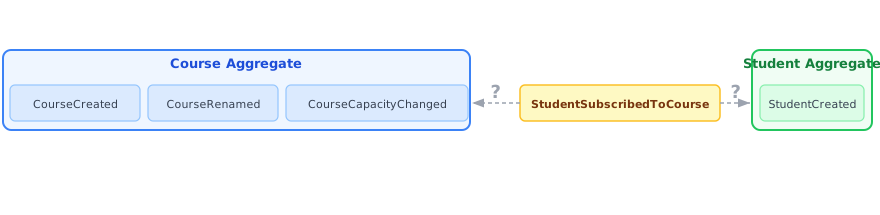
Consider the classic example from Sara Pellegrini's talk: students subscribing to courses. The event StudentSubscribedToCourse concerns both a Student and a Course — in a traditional aggregate model it is unclear which aggregate owns it, and the Course aggregate keeps growing with every new event type:
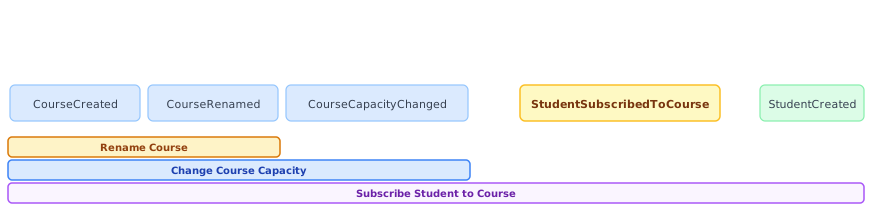
DCB resolves this by letting each command handler declare exactly which events it needs to be consistent with. Different commands define different boundaries that can freely overlap:
The DCB Query Model
The formal DCB specification (see dcb.events) expresses every read intent as a list of query items. Each item pairs an array of event types with an array of domain-identifier tags:
const queryItems = [
    { types: ['CourseCreated', 'CourseCapacityChanged', 'StudentSubscribedToCourse'],
      tags:  ['course/jdsj4'] },
    { types: ['StudentCreated', 'StudentSubscribedToCourse'],
      tags:  ['student/gfh3j'] }
];
An event matches when any item matches it: the event's type must be in that item's types and the event must carry all of that item's tags.
- Items combine with OR — any matching item is sufficient.
tagswithin an item combine with AND — all tags must be present.typeswithin an item combine with OR — any listed type is sufficient.
Both types and tags are optional per item. An item without types matches all event types; an item without tags requires no tag match. An item with neither selects all events.
Using DCB in event-storage
DCB workflows follow four steps that map directly to the query model above.
Step 1 — Configure stream indexes
query() operates on named streams. Configure typeAccessor and tagsAccessor so the store creates and maintains those streams automatically on every commit():
const store = new EventStore('my-store', {
    storageDirectory: './data',
    typeAccessor: 'type',   // dot-notation path to the event type field in the payload
    tagsAccessor: 'tags'    // dot-notation path to an array of tag strings in the payload
});
typeAccessor creates one dedicated stream per distinct event-type value — CourseCreated, StudentSubscribedToCourse, etc. tagsAccessor creates one stream per tag value under tags/{tag} — 'course/jdsj4' becomes stream tags/course/jdsj4. Tag values are recommended to use / as a hierarchy separator.
Both property paths are automatically registered in the IndexMatcher discriminant table so stream routing on every write is O(1).
New stores only: stream indexes are created with
reindex=falseand only cover events committed after the index first appears. Configure both options from the beginning if you intend to usequery().
Step 2 — Query with DcbQuery
Pass a DcbQuery object directly to query(). Its items array maps one-to-one to the query model:
const { stream, condition } = store.query({
    items: [
        { types: ['CourseCreated', 'CourseCapacityChanged'], tags: ['course/jdsj4'] },
        { types: ['StudentCreated'],                          tags: ['student/gfh3j'] }
    ]
});
query() detects the { items } shape, compiles each item to the equivalent selector algebra internally, and returns:
stream— anEventStreamof all matching events.condition— the query definition and current global event-log position; pass it tocommit()to enforce the concurrency check.
An optional second argument further narrows the boundary to exactly the events that would affect the decision:
const { stream, condition } = store.query(
    { items: [{ types: ['OrderPlaced', 'OrderShipped'] }] },
    (event, metadata) => event.orderId === 'order-42'   // optional matcher
);
The matcher can be a predicate function or the object-matcher syntax (see Event Streams → Object Matcher Syntax). Unrelated events of the same type (e.g. a different order) never cause spurious conflicts.
Note: streams listed in the query that do not exist yet are still checked correctly at commit time — a stream created by another writer between
query()andcommit()is included in the conflict check.
query() treats missing referenced streams as empty sets — a missing stream in an OR group has no effect; a missing stream in an AND group makes that branch yield nothing.
Step 3 — Build the decision model
Iterate the stream to reconstruct the application state relevant to the command:
const model = new CourseModel();
stream.forEach((event, metadata) => {
    model.apply(event);
});
Step 4 — Commit with the condition
Commit the resulting events together with the condition captured in Step 2:
try {
    store.commit('enrollment-...', [
        { type: 'StudentSubscribedToCourse', courseId: 'jdsj4', studentId: 'gfh3j', tags: ['course/jdsj4', 'student/gfh3j'] }
    ], condition);
} catch (e) {
    if (e instanceof EventStore.OptimisticConcurrencyError) {
        // A conflicting event appeared between query and commit — replay and retry
    }
}
Conflict Semantics
| Scenario | Result |
|---|---|
| No new events of any listed type appeared | ✅ No conflict |
New events appeared, but none match the matcher |
✅ No conflict |
New events appeared and at least one matches the matcher |
❌ OptimisticConcurrencyError |
New events appeared and no matcher was provided |
❌ OptimisticConcurrencyError |
Full Example
import { EventStore } from 'event-storage';

const store = new EventStore('accounts', {
    storageDirectory: './data',
    typeAccessor: 'type'
});

store.on('ready', () => {

    function handleRegisterCustomer(command) {
        const { stream, condition } = store.query(
            ['CustomerRegistered'],
            (event) => event.email === command.email
        );

        let emailTaken = false;
        stream.forEach((event) => {
            if (event.email === command.email) emailTaken = true;
        });

        if (emailTaken) {
            throw new Error(`Email ${command.email} is already registered`);
        }

        store.commit(`customer-${command.customerId}`, [
            { type: 'CustomerRegistered', customerId: command.customerId, email: command.email }
        ], condition);
    }

    handleRegisterCustomer({ customerId: 'cust-1', email: 'alice@example.com' });
});
Without Tag Streams — Matcher-Only Queries
Tag streams are optional. When tag cardinality is low or write throughput is the primary concern, encode the per-item tag logic in the matcher instead. Pass the union of all relevant types and evaluate tag membership at read time.
Prefer the object-matcher $has or $hasAny operator over a function matcher for tag containment — both compile to a fast byte-level check in raw mode and are significantly cheaper than deserialising and invoking a JS function per event.
const courseId  = 'course/jdsj4';
const studentId = 'student/gfh3j';

// $has performs an array-containment check on payload.tags without a function matcher.
const { stream, condition } = store.query(
    ['CourseCreated', 'CourseCapacityChanged', 'StudentCreated', 'StudentSubscribedToCourse'],
    {
        payload: { tags: { $has: courseId } }
    }
);

// $hasAny matches events whose tags contain any of the listed values.
const { stream, condition } = store.query(
    ['CourseCreated', 'CourseCapacityChanged', 'StudentCreated', 'StudentSubscribedToCourse'],
    {
        payload: { tags: { $hasAny: [courseId, studentId] } }
    }
);
If the per-item logic really needs cross-field OR/AND semantics that the object matcher cannot express, fall back to a function matcher:
const { stream, condition } = store.query(
    ['CourseCreated', 'CourseCapacityChanged', 'StudentCreated', 'StudentSubscribedToCourse'],
    (event, meta) =>
        (['CourseCreated', 'CourseCapacityChanged', 'StudentSubscribedToCourse'].includes(event.type)
            && event.tags?.includes(courseId))
        ||
        (['StudentCreated', 'StudentSubscribedToCourse'].includes(event.type)
            && event.tags?.includes(studentId))
);
Both variants require no tagsAccessor configuration and no tag-stream writes. The trade-off is that more events must be deserialized at read time to evaluate the matcher; $has keeps that overhead close to a raw byte scan, while function matchers force full JSON parsing per event.
Choosing Between Matcher-Only and Tag Streams
Both approaches are valid and can coexist.
- Matcher-only: no additional tag indexes to maintain; lower write amplification.
- Tag streams: more index writes per commit (one extra index write per configured tag stream), but can reduce read-time misses and deserialization/evaluation overhead when tag cardinality is high.
Rule of thumb:
- higher write load / lower read selectivity pressure → matcher-only is often better,
- lower write load / high tag diversity with many matcher misses → tag streams are often better.
Benchmark findings and practical recommendation
This benchmark section is inspired by the excellent pyeventsourcing speedrun style: a compact scenario that makes architectural trade-offs visible under sustained write-then-read pressure.
Benchmark setup in this repository:
- scenario: course subscriptions with DCB read model rebuilding,
- runtime: 3 seconds per mode,
- per iteration: 10 student registrations, 10 course registrations, 100 enrollments (120 operations total),
- each mode runs against a fresh data directory.
Recent measurements with that setup produced the following excerpt:
| Mode | Ops/s | us/op | Relative vs matcher-only |
|---|---|---|---|
| Matcher-only | 372 | 2690 | 1.00x |
| Tag-streams | 1241 | 806 | 3.34x |
| Semester-bounded stream | 3606 | 277 | 9.69x |
Mode definitions and how to apply them in practice:
- Matcher-only: query by event types and evaluate tags only via matcher logic at read time. Practical setup: keep type streams, avoid tag streams, call
query(types, matcher). - Tag-streams: materialize tags as dedicated streams and build DCB context from stream selectors. Practical setup: configure
tagsAccessorand useDcbQueryor nested selector algebra viaquery(). - Semester-bounded stream: write all decision-relevant events for a semester into
semesters/{id}so the read context stays naturally bounded. Practical setup: choose business-bounded write streams first, then query only within that boundary.
This demonstrates three important points:
- pure matcher-only DCB can degrade when the scanned context grows without a hard domain boundary,
- DCB according to the full types+tags specification is usually fast enough with tag streams, but this can create many streams and extra index writes,
- the best long-term approach is often domain partitioning (bounded write streams), so reads are naturally selective even without additional tag/type streams.
Compared to generic SQL-backed event-store speedruns (including the pyeventsourcing benchmark context), this indicates that event-storage can outperform when stream boundaries reflect real domain limits, not only technical entity ownership.
For the semester case specifically, realistic systems typically need one more filter/intersection for enrollment-relevant types because a semester stream may contain many unrelated events. Two common options are:
- keep one semester stream and intersect with enrollment-related event types during context read,
- split into
semester/{id}/students,semester/{id}/courses, andsemester/{id}/enrolments, then build the DCB context from the join of those three streams.
Selector Algebra (Advanced)
DcbQuery compiles each item to the nested selector algebra that query() and fromStreams() understand natively. The algebra uses alternating OR/AND depth semantics (see Joining Streams):
- depth 0 (top-level array): OR across query items
- depth 1 (per-item array): AND — tag stream intersected with the type-group stream
- depth 2 (inner array): OR across event types
The compiled form of the earlier DcbQuery example is equivalent to:
const { stream, condition } = store.query([
    ['tags/course/jdsj4', ['CourseCreated', 'CourseCapacityChanged']],
    ['tags/student/gfh3j', ['StudentCreated']]
]);
Selection happens at the index level: only events at the intersection of the tag stream and the relevant type streams are yielded, without deserializing unrelated documents.
You can pass the nested array form directly to query() when the query shape cannot be expressed as a flat list of { types, tags } items, or when you want full control over which streams are joined. A flat ['TypeA', 'TypeB'] is a top-level OR join over those streams. query() also supports raw mode — see Event Streams → Reading Streams.